Someone standing outside a shop in Motijheel searches for what you sell, sees your name and taps it. The screen stays white. A logo arrives, then a banner, then the banner jumps down because something loaded above it. They tap Call and nothing happens for a second. By then they have gone back to the results and tapped the next name.
You will never see that visit in any report as a lost customer. It shows up, if at all, as a slightly lower number of enquiries than the month deserved.
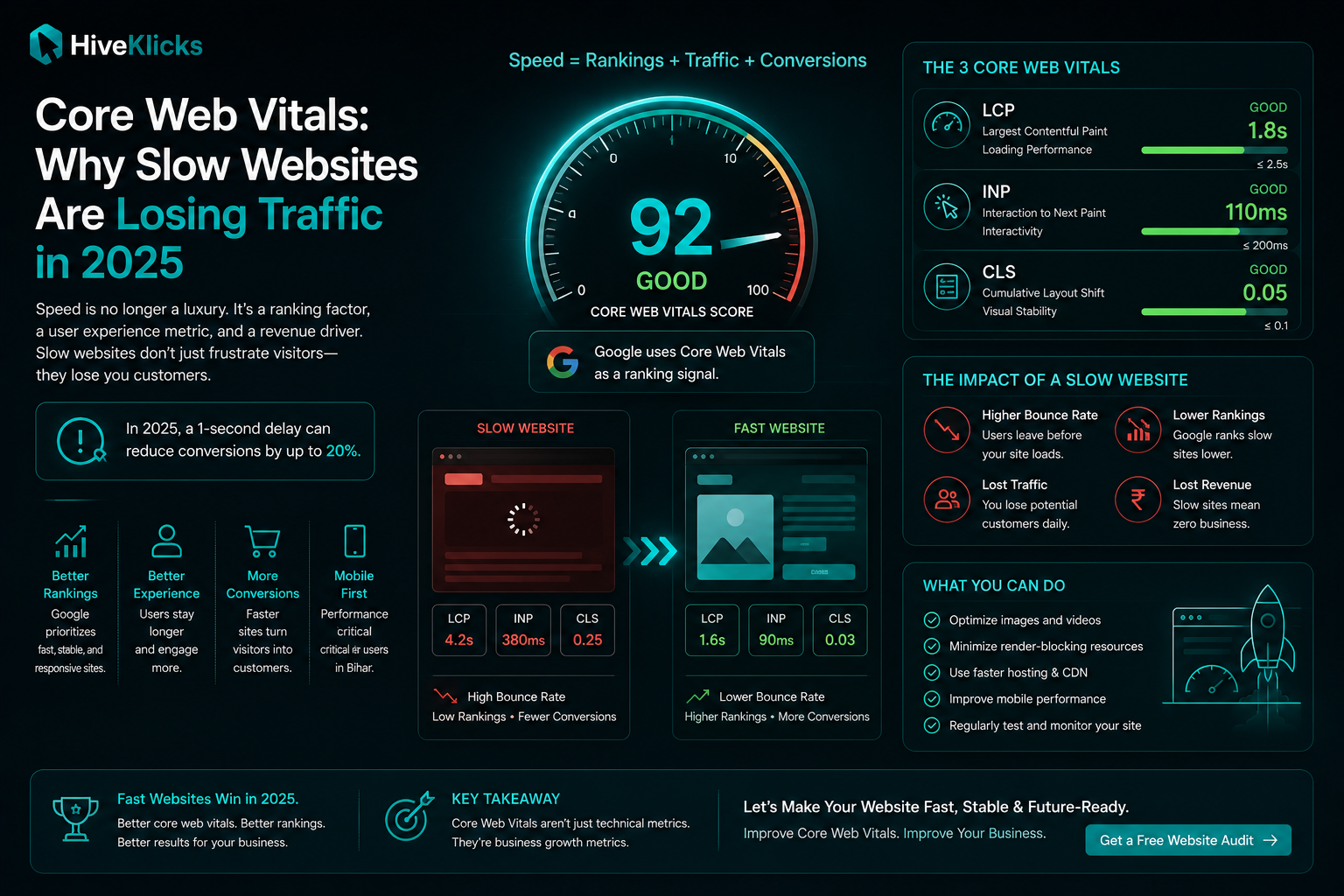
That wait is measurable. Google calls the measurements Core Web Vitals: three numbers that describe how a page loads, how quickly it responds to a tap, and how much it moves around while loading. They are collected from actual visits by people using Chrome, they are public, and you can look up your own in a few minutes without paying anyone.
This guide explains the three numbers in plain language, is clear about what they do and do not do for your Google rankings, and then goes through the fixes in the order that usually pays off for a business website in Bihar.
The Three Numbers, in Plain Language
Each number answers one question a visitor would ask if they could.
| Metric | The visitor’s question | Good | Needs work | Poor |
|---|---|---|---|---|
| LCP Largest Contentful Paint | How long until I can see the main thing on this page? | 2.5 seconds or less | Up to 4 seconds | Over 4 seconds |
| INP Interaction to Next Paint | When I tap something, how long until the page reacts? | 200 ms or less | Up to 500 ms | Over 500 ms |
| CLS Cumulative Layout Shift | Does the page stay still, or do things jump as it loads? | 0.1 or less | Up to 0.25 | Over 0.25 |
Three details about how these are judged matter more than the definitions.
- They come from real visits. Google gathers them from people who actually opened your page in Chrome, over the previous 28 days. A test run on a developer’s laptop is a different thing, and we will come back to that.
- The bar is the 75th percentile. A page passes when three out of four visits are good. Your fastest visitors do not count for much; the slower quarter decides the result.
- Mobile and desktop are scored separately. For a local business the mobile result is the one that matters, because that is where almost all of your visitors are.
If you have read older guides that mention FID (First Input Delay), that metric was retired in March 2024 and replaced by INP, which is stricter. A site that passed comfortably under the old measure can fail under the new one without anything on the site having changed.
What Core Web Vitals Do and Do Not Do for Rankings
This is where most articles overstate the case, so it is worth being exact.
Core Web Vitals are part of what Google calls page experience, and Google’s ranking systems do take page experience into account. But relevance comes first. A slow page that answers the search well will still outrank a fast page that does not. Passing all three numbers does not lift a page to the top, and failing them does not remove it from the results.
Where speed starts to count is when several pages are about equally useful for the same search. That describes most local searches in Bihar: five boutiques, six coaching institutes or four diagnostic labs, all with similar pages saying similar things. When the content is close, the page that loads and behaves well has an edge.
The second effect has nothing to do with ranking, and for most small businesses it is the larger one. A visitor who leaves before the page finishes loading was already won. You ranked, or you paid for the click, or someone forwarded your link on WhatsApp. The page then lost them. Fixing that raises enquiries from the traffic you already have, which is why we treat speed as a conversion problem first and a ranking problem second.
There is also a quieter third reason. Search is no longer only a list of links. Google’s AI Overviews and assistants such as ChatGPT, Gemini and Perplexity read pages to compose answers, and many of their crawlers do not run JavaScript at all. A page whose content arrives quickly as plain, well-structured HTML is easier for every one of them to read. Nobody can promise a mention in an AI answer, but being readable is the part you control, and it is the starting point for AI search optimization.
Why This Bites Harder in Bihar
Website speed advice is mostly written by people testing on new iPhones over office broadband. The conditions here are different in three ways.
The phone. A large share of your visitors use entry-level and mid-range Android phones with modest processors and limited memory. These phones download a page almost as fast as an expensive one, then take far longer to run it. Every script on your page (the slider, the chat bubble, the animation library, three tracking pixels) has to be processed by that small processor before the page will respond to a tap. This is why INP is the number local sites fail most often.
The network. Mobile data is cheap and widespread, but its quality changes by locality and by hour. The same page that opens in two seconds at noon can take six in a crowded market at seven in the evening. Because the 75th percentile is what counts, those evening visits are the ones setting your score.
The way sites here get built. Many local business websites start from a heavy multipurpose theme with a page builder on top, a full-width slider of four banners, and a dozen plugins. Banners are often exported straight from a design tool at 3 to 5 MB each, with the offer text baked into the picture. Each choice is reasonable on its own. Together they produce a home page that weighs more than a short video.
None of this is a reason to give up on having a good-looking site. It is a reason to build for the phone in the customer’s hand, which is the thinking behind how we approach website design in Bihar.
How to Check Your Own Site in Ten Minutes
You do not need an agency or a paid tool for this. Do the steps in order.
- Open PageSpeed Insights (pagespeed.web.dev), paste your home page address and run the test. Stay on the Mobile tab.
- Read the top section first. It is headed “Discover what your real users are experiencing” and shows LCP, INP and CLS from real visits, with a pass or fail. This is the result Google uses.
- Then read the lower section, headed “Diagnose performance issues”. This is a simulated test, with a score out of 100 and a list of suggested fixes. It is useful for finding causes. It is not your grade.
- Repeat for your two most important inner pages, usually a service or product page and the contact page. Home pages are often the slowest page on a site and the least representative.
- Open Google Search Console, if you have it set up, and look at the Core Web Vitals report under Experience. It groups your pages into good, needs improvement and poor, and tells you which problem affects which group.
- Do the pocket test. Switch off Wi-Fi, open a private tab on the cheapest phone in your shop, and load your own site on mobile data. Count the seconds until you could read something. Tap a button and notice whether it answers at once.
“No data” is common, and it is not a pass
Google only publishes real-visit numbers for pages with enough Chrome traffic. Many small business sites do not reach that level, so the top section says no data is available. In that case the simulated test and the pocket test are all you have. Treat the simulated numbers as an estimate from a mid-range phone on a slow connection, which is close to the visitor you care about, and fix what it flags.
One caution about the score out of 100. It is easy to become fixed on reaching 95, and some developers will sell you that number. A lab score of 95 on a site whose real visitors still wait five seconds has achieved nothing. A score of 70 on a site that passes all three real-visit numbers is fine. Chase the three numbers, in the field, on mobile.
If you would rather have the checks run for you, our free website audit looks at speed alongside Google visibility and whether your call and WhatsApp buttons work, and gives you the result in about a minute.
Fixing LCP: Get the Main Thing on Screen
LCP measures when the largest visible item finishes appearing. On most business sites that item is the banner image at the top, and sometimes the main heading. PageSpeed Insights tells you which element it is; look for “Largest Contentful Paint element” in the diagnostics.
The time is spent in four places: the server answering, the browser discovering that the image exists, the image downloading, and the browser drawing it. The fixes below are in the order they usually pay off.
Make the banner the right size
A banner shown 400 pixels wide on a phone does not need to be 4,000 pixels wide in the file. Export it at roughly twice the size it displays, save it as WebP or AVIF, and it will normally come in well under 200 KB with no visible loss. This one change fixes more failing LCP scores than everything else combined.
Never lazy-load the first image
Lazy loading tells the browser to wait before fetching an image. It is the right choice for pictures further down the page and the wrong one for the banner. Many themes apply it to every image by default. The first image should load eagerly and be marked as high priority (developers will know this as fetchpriority="high").
Take the words out of the picture
“Admissions Open 2026–27” baked into a banner image forces a large file, cannot be read by Google or by a screen reader, and has to be redesigned every time the offer changes. Put the words on the page as text over a lighter image. The page loads faster and the text can be found in search.
Replace the slider with one strong banner
A four-slide carousel loads four large images and a script to move them, so that visitors can see slides two to four, which very few wait for. One well-chosen banner is faster and almost always clearer.
Then look at the server
If the page takes over a second before anything starts to arrive, the hosting is the bottleneck. Page caching, compression and a content delivery network with servers in India usually solve it without changing host. Cheap shared hosting with none of these switched on is a common cause of a slow first byte.
Fixing INP: Make Taps Respond
INP measures the delay between a tap and the page visibly reacting, across the whole visit. A poor result nearly always means the phone is busy running JavaScript when the person taps. The fix is to give it less to run.
Start with a list of everything third-party on the page. On a typical local site that list has a live chat widget, two or three analytics and advertising tags, a slider script, an animation library, a popup tool, and an embedded map or video. Then ask of each one whether it has earned its place.
- Chat widgets. A floating WhatsApp button that is a plain link costs almost nothing. A full chat widget that loads its own interface can add hundreds of kilobytes of script to every page. For most shops, clinics and institutes, the link does the same job.
- Tracking tags. Keep the ones somebody reads. Old pixels from campaigns that ended, a second analytics tool nobody opens, and heat-map scripts left on from a trial can all be removed.
- Maps and videos. An embedded Google Map or YouTube player loads a great deal of code before anyone touches it. Show a still image that opens the map or plays the video when tapped.
- Animations and popups. Scroll effects and entry popups are the most expensive decoration on a slow phone. Keep the ones that help a visitor decide and drop the rest.
Whatever remains should be loaded so that it does not block the page: deferred, or started only after the visitor first scrolls or taps. A developer can do this in an afternoon for most sites.
Fixing CLS: Stop the Page Jumping
Layout shift is the easiest of the three to understand, because everyone has experienced it: you go to tap one thing, the page moves, and you tap another. On a business site the cost is concrete. The thing people are trying to tap is usually your phone number.
The causes are few, and each has a simple fix.
- Images without dimensions. If the page does not say how tall an image will be, the browser leaves no room and pushes everything down when it arrives. Every image and video should have its width and height set.
- Things added above the content after loading. Offer strips, cookie notices and “download our app” bars that drop in from the top move the whole page. Reserve their space from the start, or place them over the page instead of in it.
- Fonts swapping. When a custom font loads late, text can change size and reflow. Loading fewer font weights and choosing a fallback of similar width keeps the shift small.
- Embeds that grow. Review widgets, social feeds and ad slots often start small and expand. Give each a fixed minimum height.
What to Fix First
If you can only do a few things, this is the order we would work in for a typical small business site. Effort is for a competent developer.
| Problem | Number it hurts | Effort | Who decides |
|---|---|---|---|
| Oversized banner and gallery images | LCP | An hour or two | Whoever uploads photos |
| First image set to lazy-load | LCP | Minutes | Developer |
| Live chat widget instead of a WhatsApp link | INP | Minutes | Owner |
| Unused tracking tags and old pixels | INP | An hour | Owner and developer |
| Images and embeds with no reserved space | CLS | A few hours | Developer |
| Home page slider | LCP, INP and CLS | Half a day | Owner |
| No caching, compression or CDN | LCP | Half a day | Developer or host |
| Heavy theme and page builder | All three | A rebuild | Owner |
Notice how many of these are owner decisions and not technical ones. A developer can compress an image, but only you can agree that the slider goes, or that the chat widget becomes a link. Most slow sites stay slow because nobody with authority made those calls.
When Fixing Is Not Enough
Everything above assumes a site that is basically sound and carrying extra weight. Some sites are the weight. If a five-page site loads two megabytes of theme code before showing a word, runs thirty plugins, and was assembled in a page builder that wraps every paragraph in six layers of markup, each fix removes a little and the next plugin update puts it back.
Three signs that a rebuild will cost less than continued patching:
- You have already compressed images and removed scripts, and mobile LCP is still above four seconds.
- Nobody can say what half the installed plugins do, and removing any of them breaks a page.
- The site was built on a template chosen for how its demo looked on a desktop.
A site written by hand for its own content has none of that baggage, which is why it tends to pass all three numbers without special effort. HiveKlicks builds this way, with websites from ₹15,000. We also run a speed check at the start of every engagement for SEO services in Muzaffarpur, SEO services in Patna and SEO services in Gaya, because there is little point earning a ranking that the page then wastes.
Keeping It Fast
Speed is rarely lost in one decision. It goes a banner at a time: a festival offer uploaded at full size, a new pixel for one campaign, a popup someone thought would help. Six months later the site is slow again and nobody changed anything important.
A light routine prevents that.
- Re-test after every change. Run PageSpeed Insights before and after adding anything, and keep both results.
- Give uploads a rule. Nothing over 200 KB goes on the site, and whoever uploads photos knows how to export them.
- Review scripts every quarter. If nobody can name who reads a tag’s data, remove it.
- Check monthly. Note the three numbers next to your enquiry count. The link between them is easier to believe once you have watched it in your own figures; the enquiry rate is one of the 5 marketing numbers worth tracking.
Speed is one part of how a business comes across online. The rest (photography, consistency, reviews, a profile that is kept up to date) is covered in our guide to what a professional online presence looks like, and if the problem is being found in the first place, start with why most local businesses stay invisible on Google.
Want Your Site Tested on the Phones Your Customers Use?
Run the free audit first; it takes about a minute and needs no sign-up. If the numbers come back red, send us the report and we will tell you which fixes are a morning’s work and which mean the site has outgrown its template.
Run the Free Website Audit →